Category: Ticket System

Create tickets in 3rd party tools from SAP Fiori, WebGUI and Business Client

Create tickets in ITSM tools from SAP Fiori, WebGUI and Business Client

Simplify SAP support processes regardless of UI technology

Although the classic SAP GUI is still the most popular UI used by SAP end users, there are a few different other UIs. SAP Fiori is the most recent and modern one, which is also mobile friendly.

Naturally SAP is not an error-free software, so end users have to report problems from time to time. Our SAP add-on helps them to create tickets much quicker in any ITSM tool. Additionally, the add-on helps support staff too by attaching a lot of valuable information to each ticket it creates.

SAP Fiori

SAP provides a standard feature for creating support messages in SAP Solution Manager from Fiori apps. However, often SAP customers use other third party ITSM tools to track SAP incidents. For them, the best solution is would be to forward the support messages to their ticketing tool instead of creating a support message in Solution Manager Service Desk.

Our SAP add-on can do this out of the box: it enhances the standard ticket creation process by forwarding the tickets to the third party ITSM platform you define.

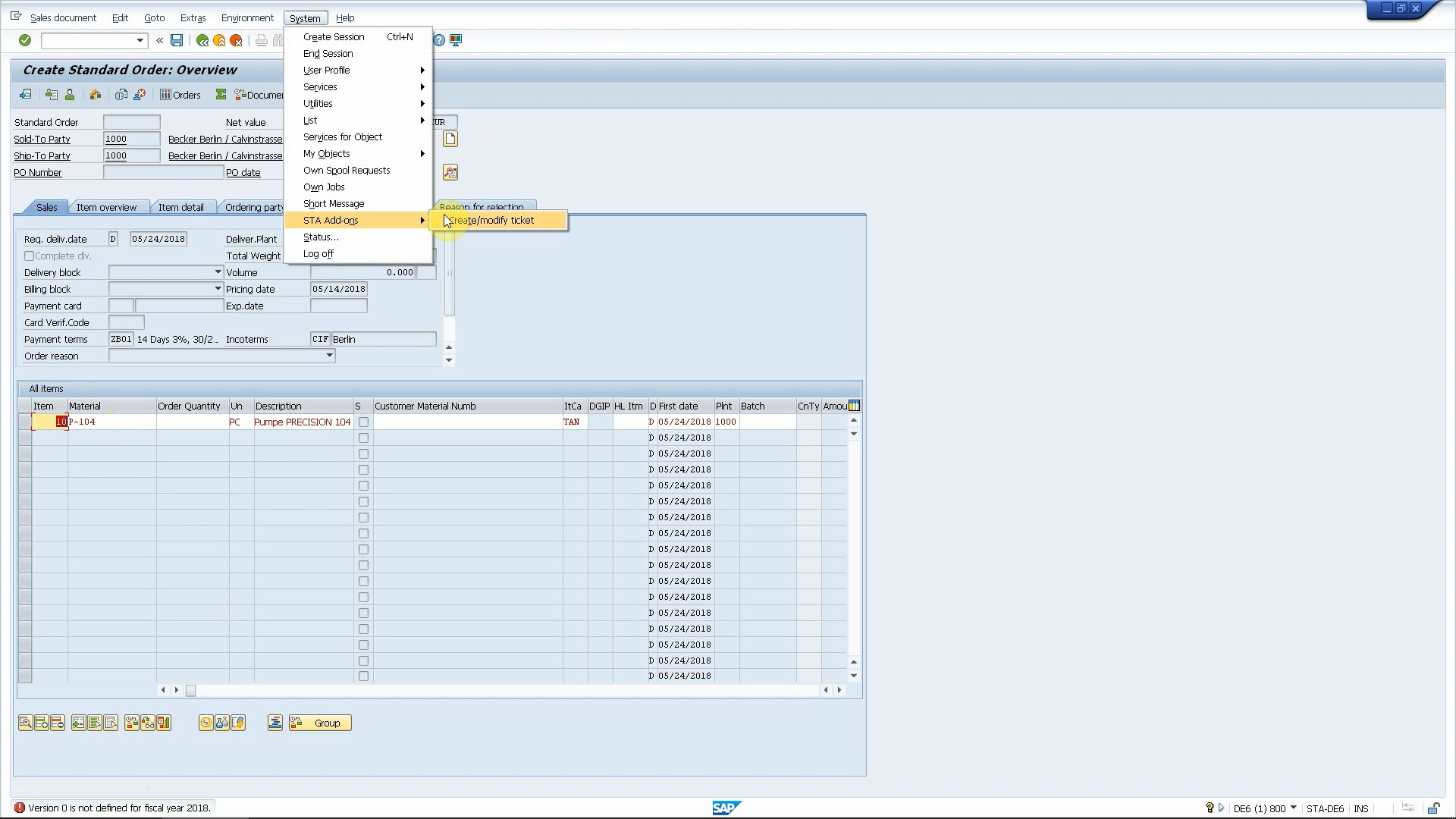
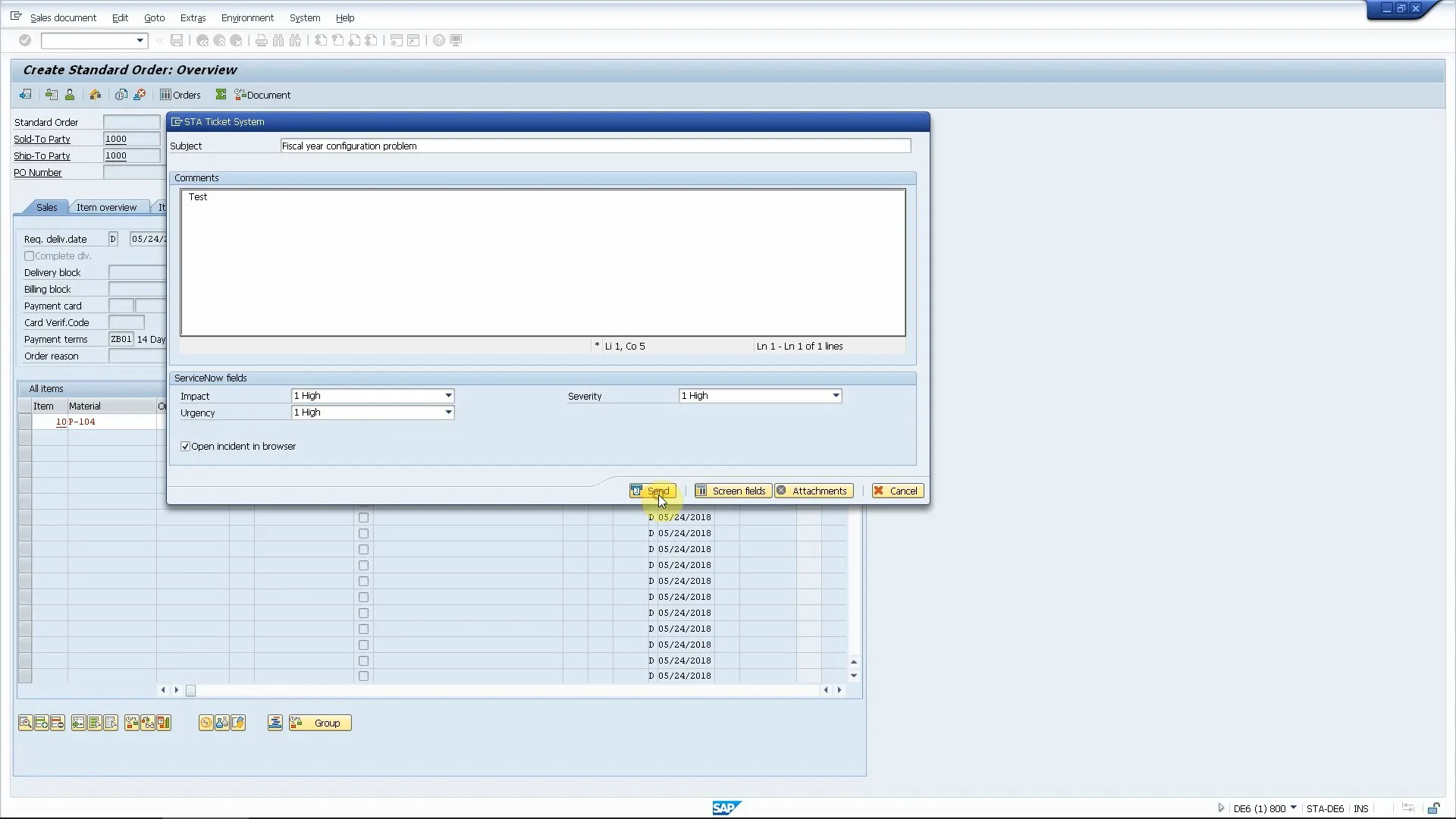
Our Ticket System not only creates the ticket for you but it automatically attaches valuable information about the problematic Fiori app, the SAP system and SAP user too. This greatly reduces the required effort to clarify all details and gather all information so support experts can start working on the solution.
Take a look at how this works with ServiceNow, JIRA, ManageEngine ServiceDesk Plus and Freshservice as examples:

This helps end users a lot as they have to spend less time to create error reports and they don’t have to learn new user interfaces if the company changes to another ITSM tool. The UI and the process will always be the same, only the integration in the background may be changed.

WebGUI and Business Client

Some customers also use the old WebGUI, which allows them to access any SAP transaction from a web browser. Also, SAP has introduced Business Client recently, which has a native and an HTML mode. Our Ticket System for SAP supports all these use cases so your SAP end users can submit tickets to external ITSM platforms and ticketing tools from these less common SAP UI technologies too.

Learn how you can submit tickets from WebGUI and Business Client to ServiceNow:

Next steps

Schedule a demo

Let’s make a conference call and show you how our products work and answer all your questions.

Download a free trial

Get a free 30-day trial and test the product in your own SAP systems.

Get in touch

Still have questions? Do not hesitate to contact us and get them answered.

Sharing is caring

Integrate ServiceNow and SAP Solution Manager Monitoring and Alerting Infrastructure

Integrate ServiceNow and SAP Solution Manager Monitoring and Alerting Infrastructure

Create ServiceNow incidents when Solution Manager alerts are triggered

Integrate ServiceNow and SAP SolMan

Many companies use SAP Solution Manager to monitor their SAP and non-SAP systems and for business process monitoring too. However, a lot of them do not use the Service Desk module of Solution Manager. Instead, they use ServiceNow for IT service management.

A common request is to integrate the two platforms to leverage the benefits of both worlds.

Set up monitoring in Solution Manager

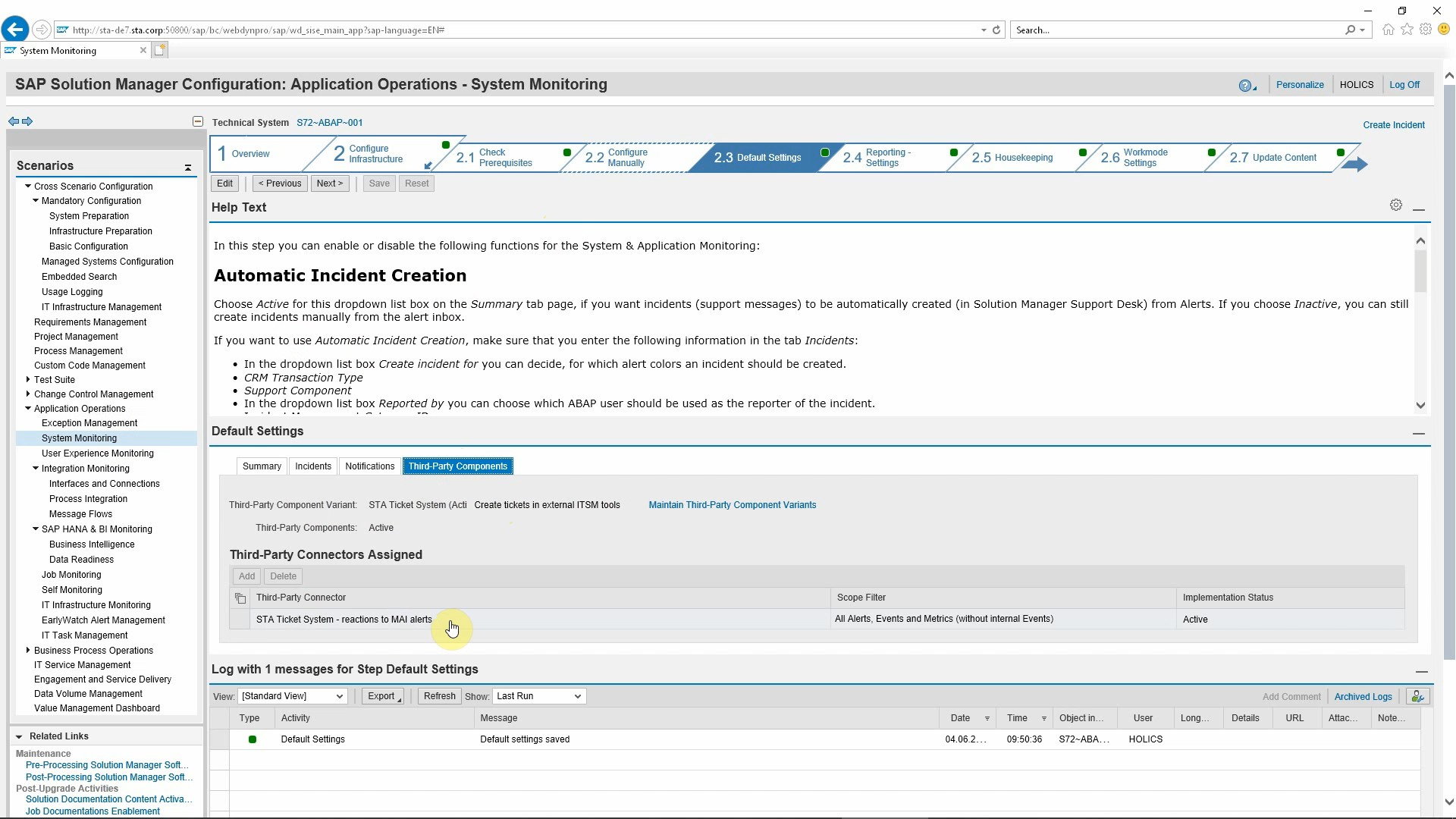
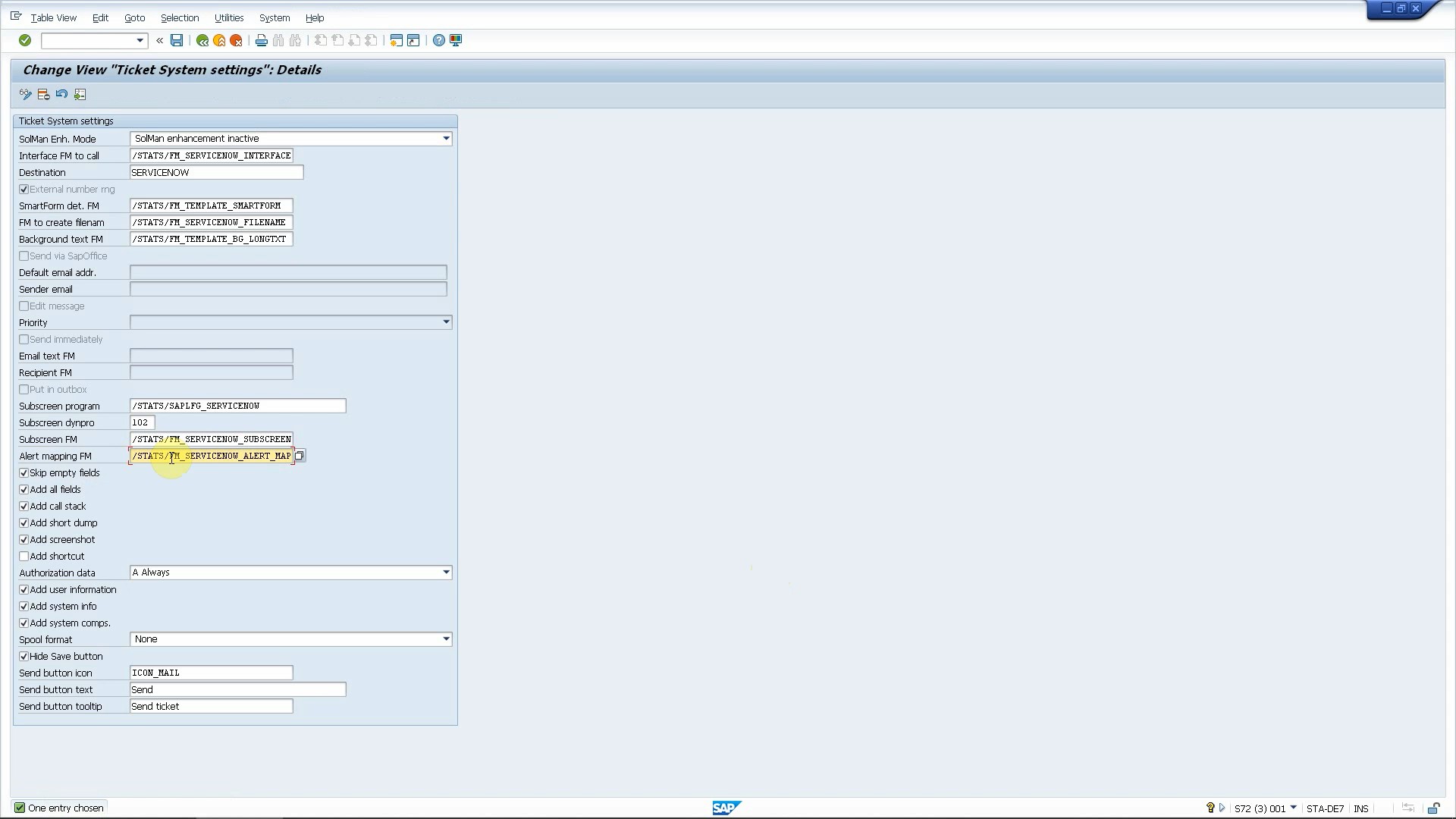
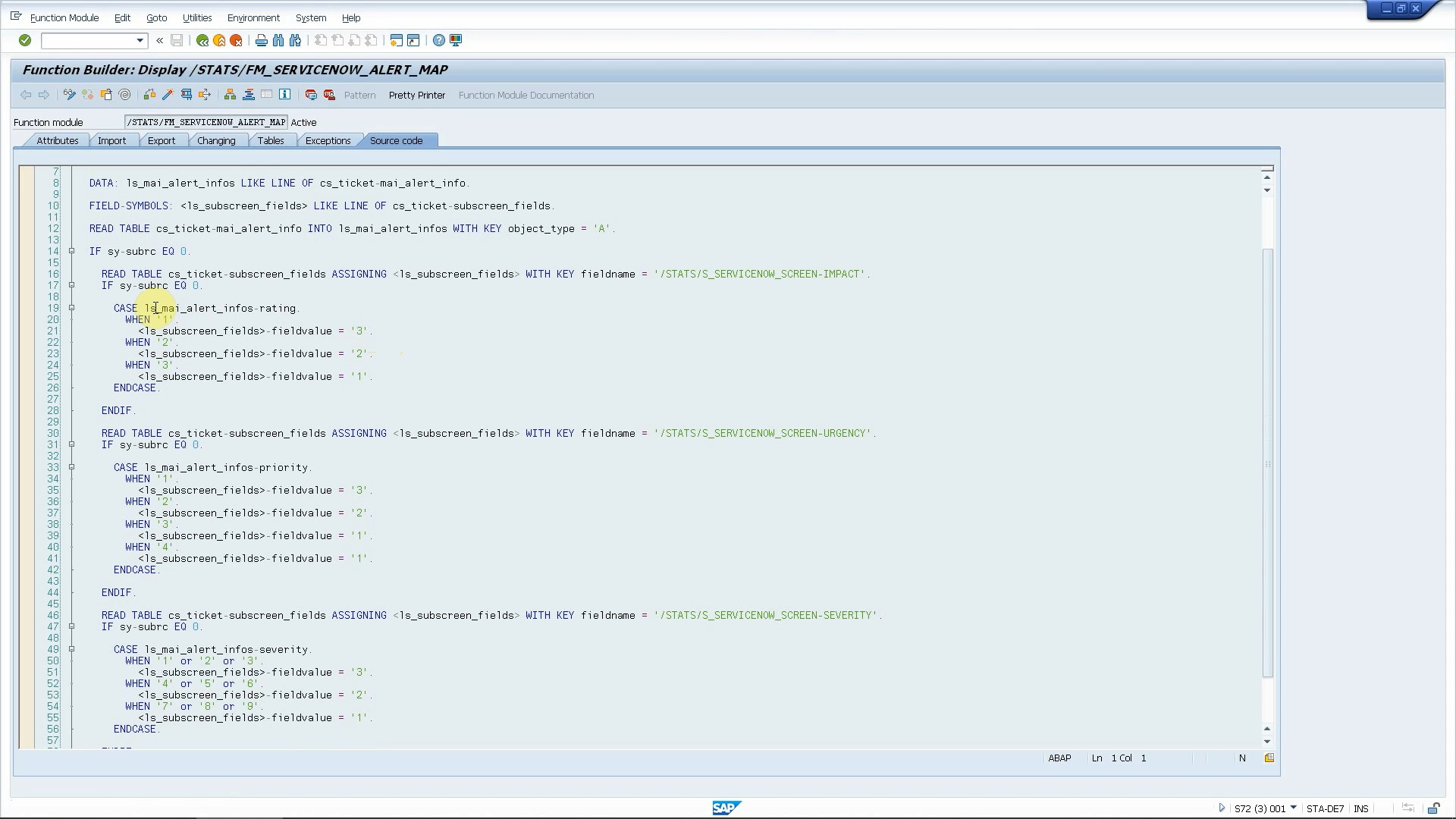
Once you have configured the monitoring in SolMan (which is not in the scope of this blog post), all you need to do is to specify our SAP add-on as a third party connector for your alerts. After setting this, you are ready to forward your alerts to ServiceNow. You just need to define which alerts you want to forward based on managed object type and name, alert severity, rating and other fields. In a simple customization screen, you can define which alerts to forward. Using a custom ABAP logic, you can map ServiceNow field values (priority, severity etc.) to the properties of Solution Manager alerts (rating, severity etc.). Finally, some basic configuration is needed to connect your SolMan and ServiceNow systems (assign text templates to alerts, set up RFC connection to ServiceNow etc.).

Let’s see it in action

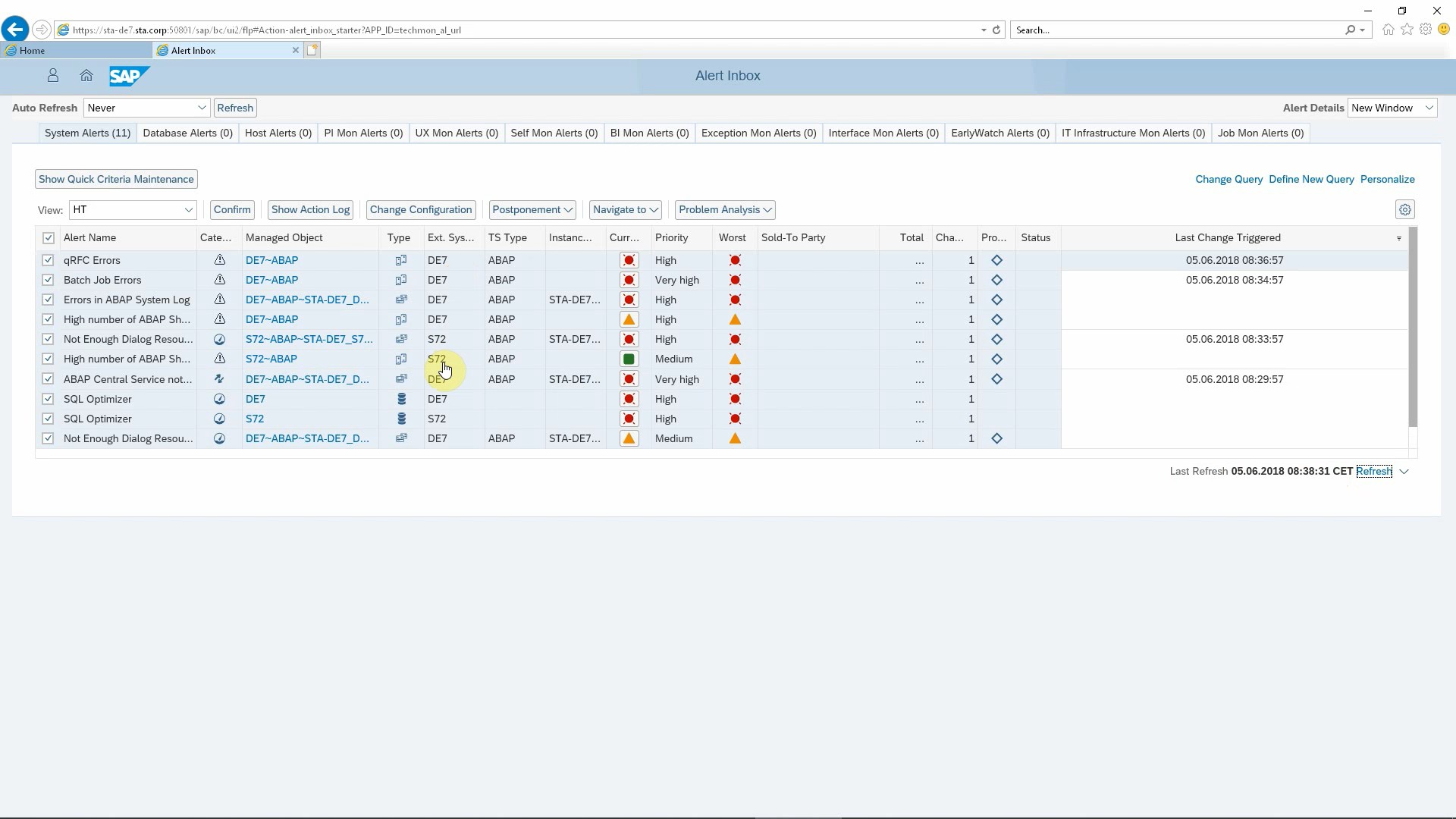
Now it’s time to see how this works. We have made a lot of effort to trigger as many alerts as we could in order to have many entries in our SolMan Alert Inbox. Whenever an alert pops up in the Alert Inbox, a ServiceNow incident is created automatically, without any human effort. ServiceNow fields are set according to the configuration in SAP, incident description and short text contain meaningful information and even direct links to relevant SAP transactions. This allows your service desk to take immediate action to analyze the problem and to provide a solution faster.

Additional benefits

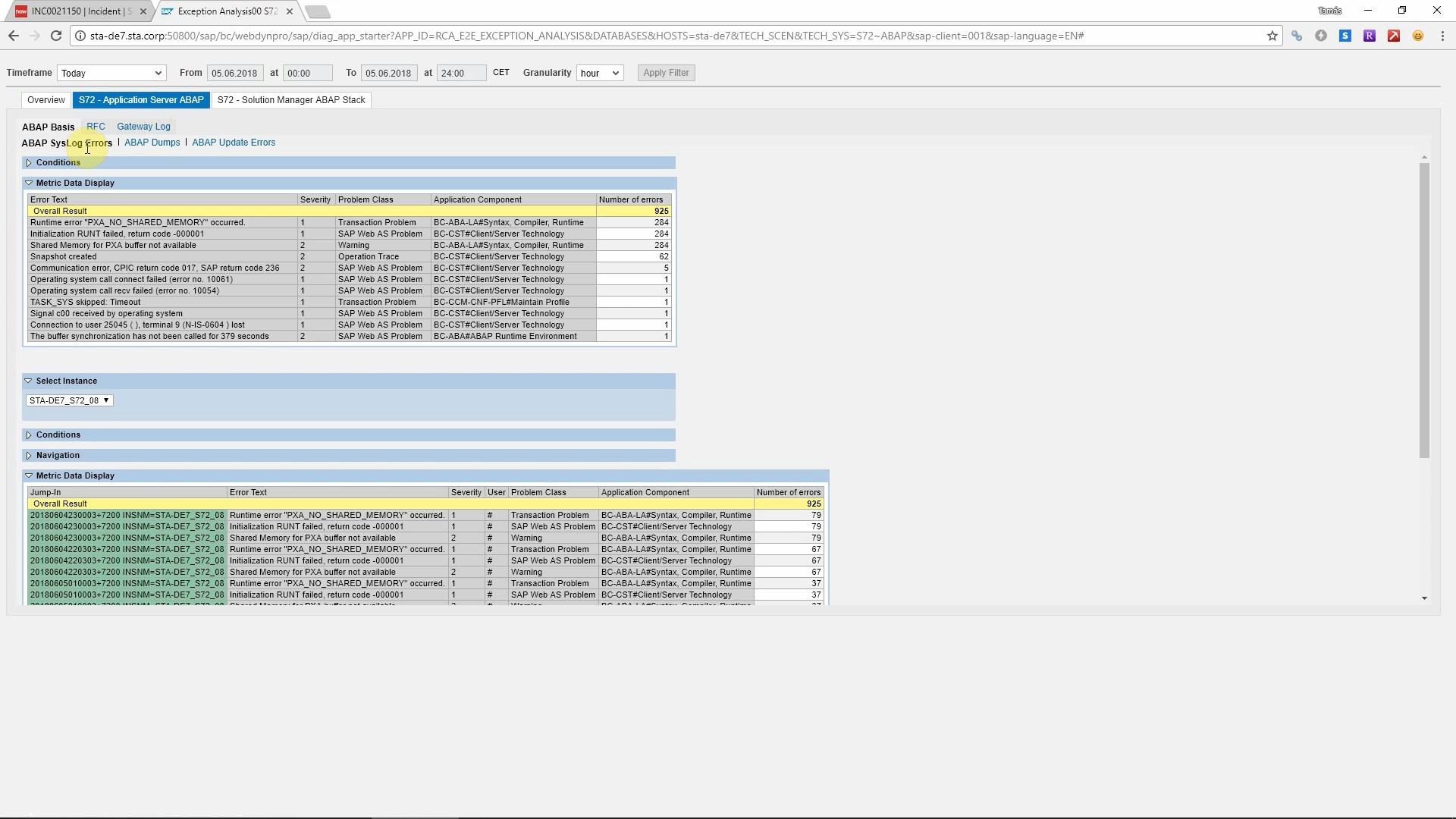
The obvious benefits of this integration are reduced human effort, quicker reactions to alerts and maximizing the ROI on your investments in ServiceNow and SAP Solution Manager. However, there is more than that! All relevant SAP information is added to custom ServiceNow tables. Details of the affected SAP system (managed object), alert, event and all metrics are saved in ServiceNow and displayed on the incident form as a related list. Clicking on one item, you can get all details that can help you to understand the problem and to provide a solution faster.

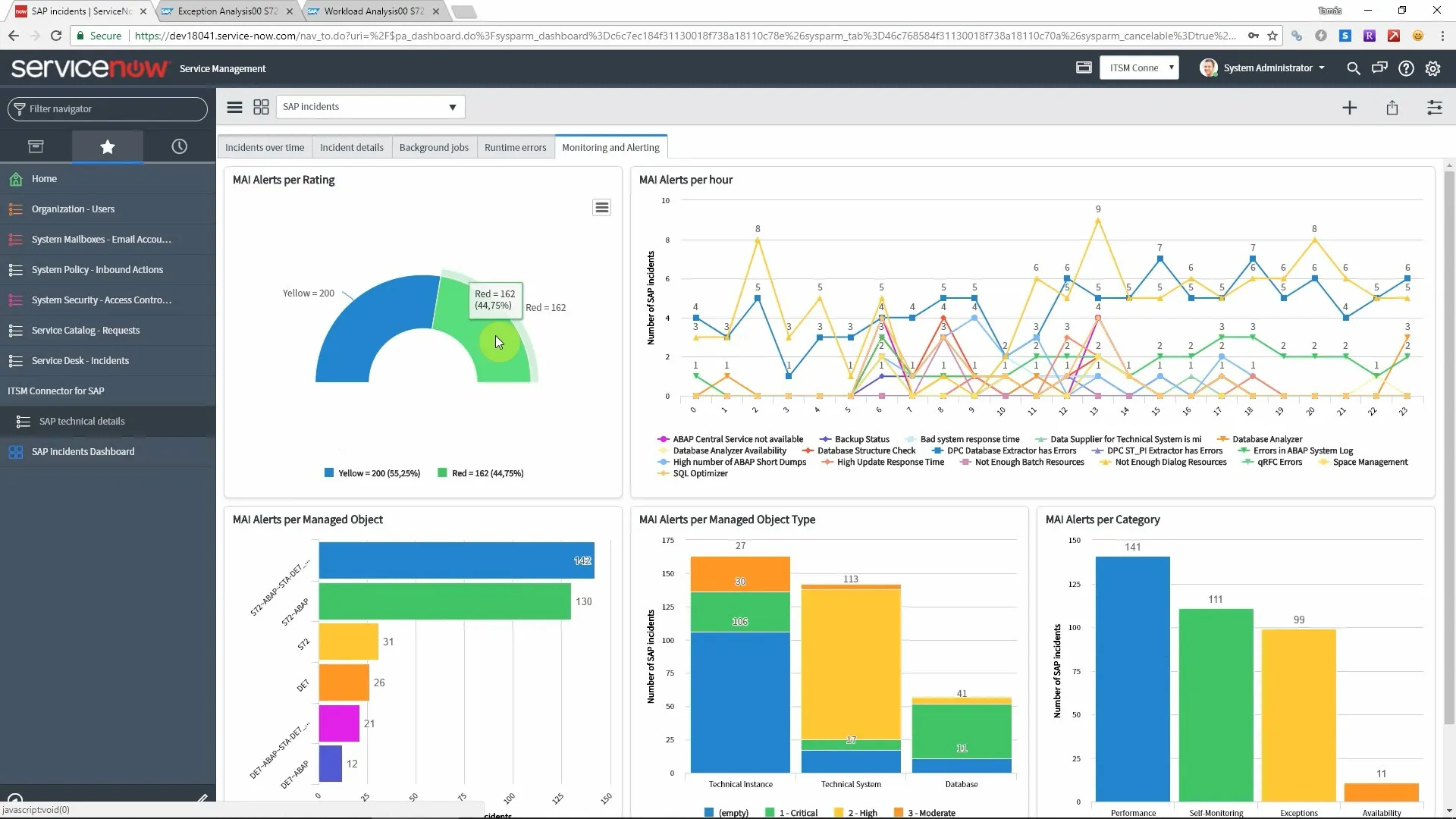
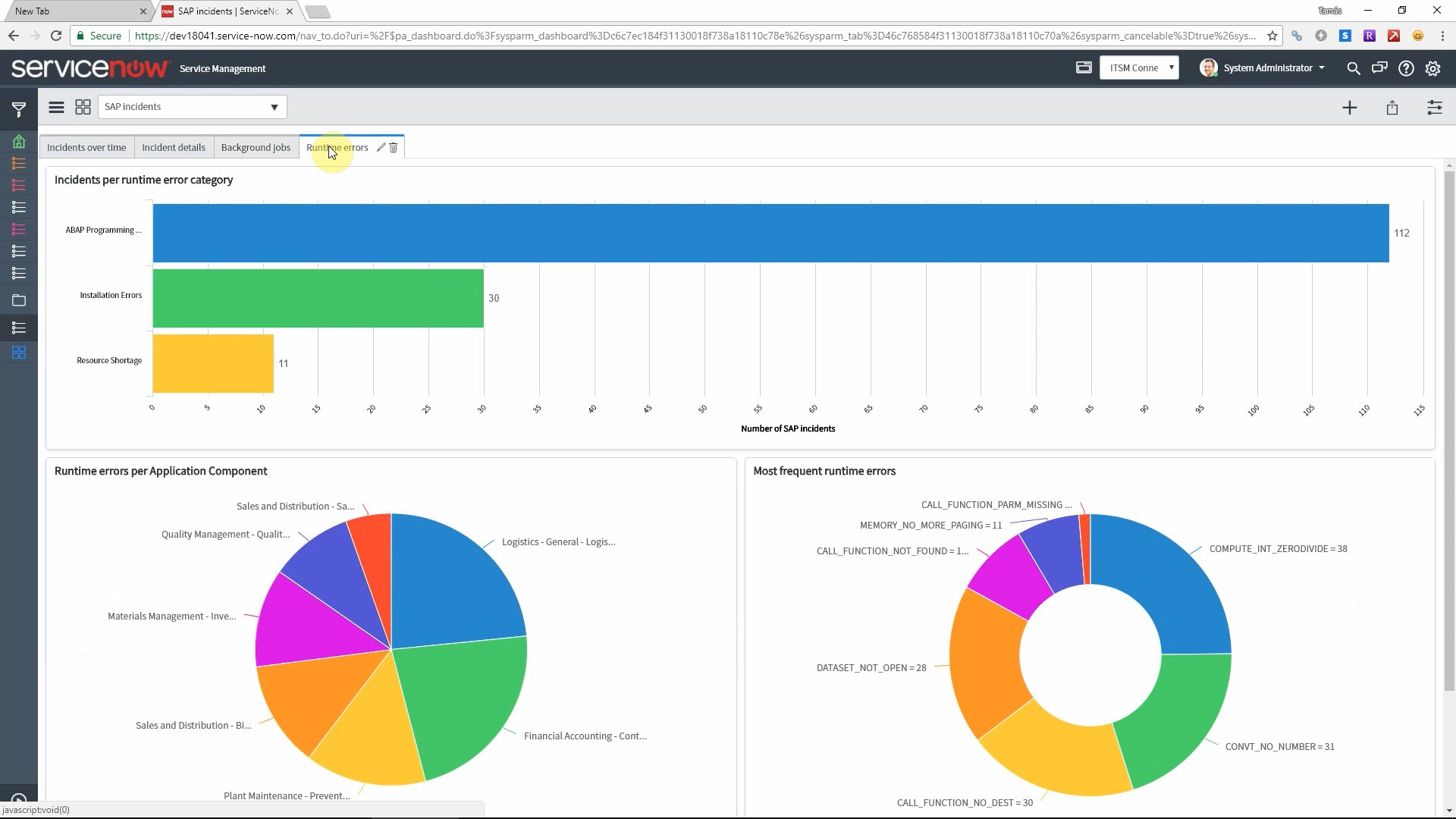
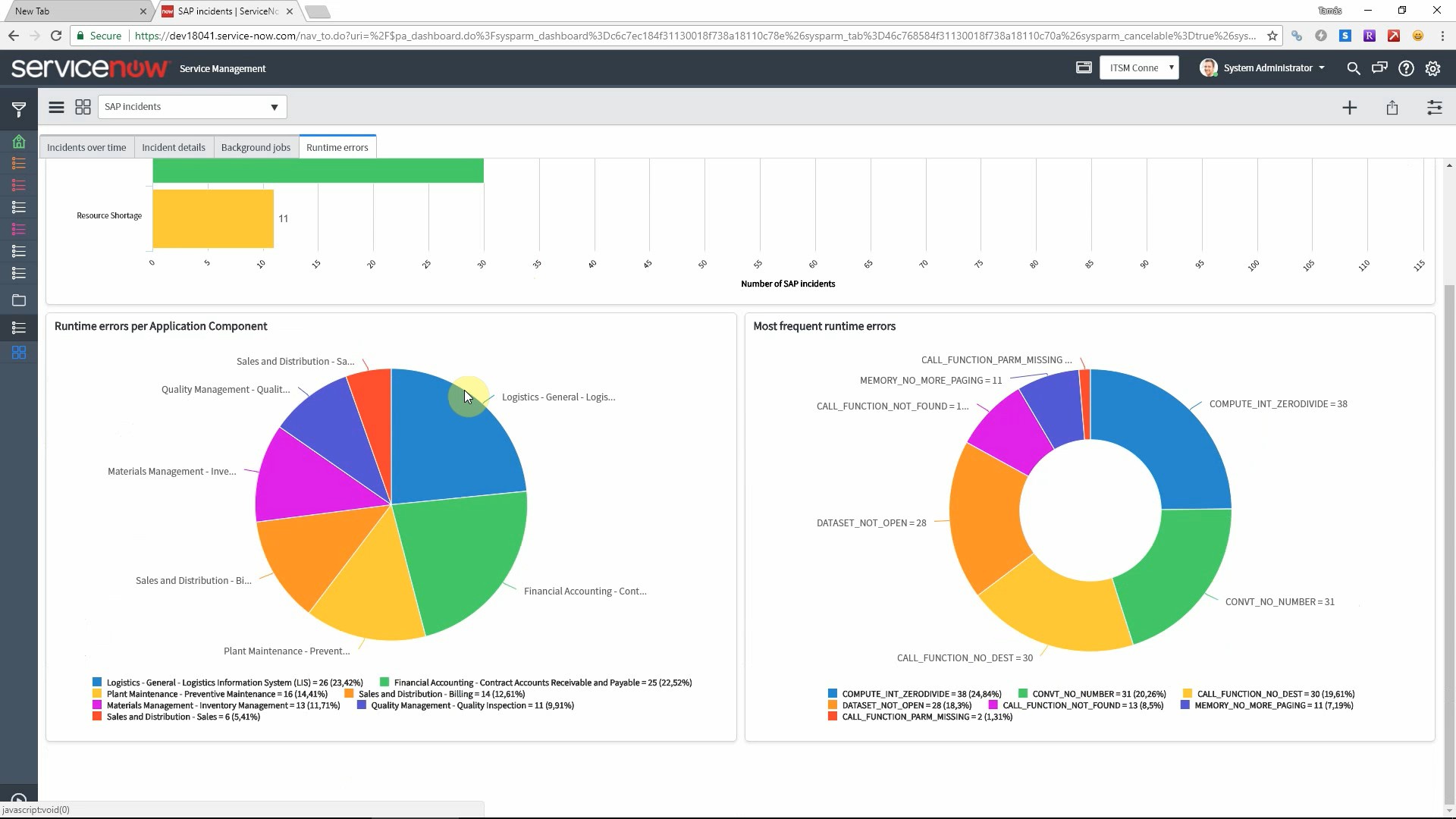
We also deliver a dashboard on SAP related incidents with a tabsheet dedicated to incidents raised for Solution Manager alerts. This allows you to find trends, identify bottlenecks and better plan your resources by providing insights into your monitored systems and processes.


Videos

You can watch how the integration works in the video below.

Next steps

Schedule a demo

Let’s make a conference call and show you how our products work and answer all your questions.

Download a free trial

Get a free 30-day trial and test the product in your own SAP systems.

Get in touch

Still have questions? Do not hesitate to contact us and get them answered.

Sharing is caring
Eliminate duplicate tickets from your IT service desk

Eliminate duplicate tickets from your SAP IT service desk

Reduce total incoming ticket volume by up to 20%

A new research by Quocirca and Splunk, Damage Control – The impact of critical IT incidents, shows how important is how organizations handle duplicate incidents.

The worldwide research found that an more than 13% of all incidents are repeat incidents, resulting from the inability to accurately determine the root cause of problems.

Just like with repeat incidents, organisations are struggling with problems being logged multiple times and handled in parallel. More than 17% of the total ticket volume are duplicates (on top of the 13% of repeats). 

Overall, the average large organisation can expect 852 duplicate or repeat incidents a month. This results in wasted IT resources and subsequent costs as well as reduced customer satisfaction.

Display similar submitted tickets before creating a new one

Using our Ticket System for SAP, your SAP end users can report errors right from the SAP GUI where the error happened. The program also stores all technical details in a custom SAP table, so it can check if a new ticket is being created from the same transaction (report or screen) where a ticket was submitted recently. If there are similar tickets submitted to the one being created, those will be displayed in a popup window so the end user can check if the issue is already sent to the service desk.

The program identifies similar tickets based on the current SAP transaction code, program name, last error message or other technical attributes. In case of a runtime error, the exact line number of the program code where the error occurred must be the same. Additionally, you can implement your custom business logic to identify similar tickets. You can also define the interval for which the program shall check related tickets (for example 24 hours or one week).

Take action: cancel, create new or link ticket

If any of the displayed tickets is exactly for the same problem the user wants to report, then he/she can cancel the creation of a new ticket. This will reduce the number of tickets that must be handled by the service desk. 

If your ITSM tool supports linking tickets together, then the user has the option to select a recently submitted ticket, and create a new ticket that will be linked to the selected ticket. For example ServiceNow and JIRA has this feature, as you can see this in the videos below.

Naturally the third option is to create a new ticket if none of the displayed similar tickets match the exact problem of the end user.

Benefits

It is easy to see to understand why keeping the number of duplicate tickets as low as possible is crucial for any company. Actually, according to the study mentioned in the introduction, duplicate and repeat incidents are the top two factors impacting the efficiency of IT service management.

If you have an SAP error that affects 100 users, you won’t have 100 incidents sent to your service desk that may keep busy a lot of your support team members. This results in an enormous boost in efficiency and to better SAP support KPIs.

Videos

You can see how our Ticket System can help you to reduce the number of duplicate SAP incidents.

Next steps

Schedule a demo

Let’s make a conference call and show you how our products work and answer all your questions.

Download a free trial

Get a free 30-day trial and test the product in your own SAP systems.

Get in touch

Still have questions? Do not hesitate to contact us and get them answered.

Sharing is caring

Scoped Application for ServiceNow – SAP integration

ITSM Connector for SAP

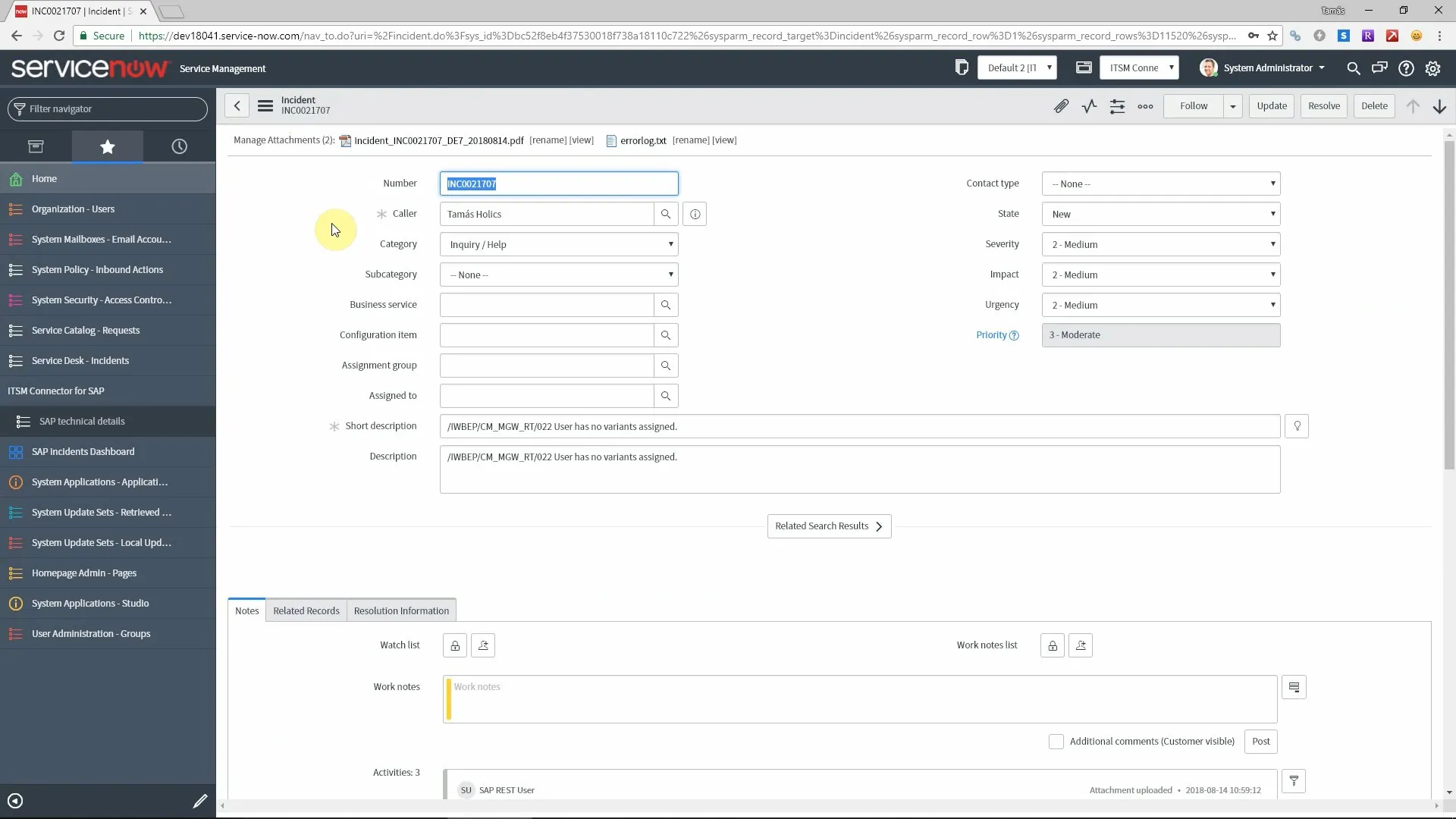
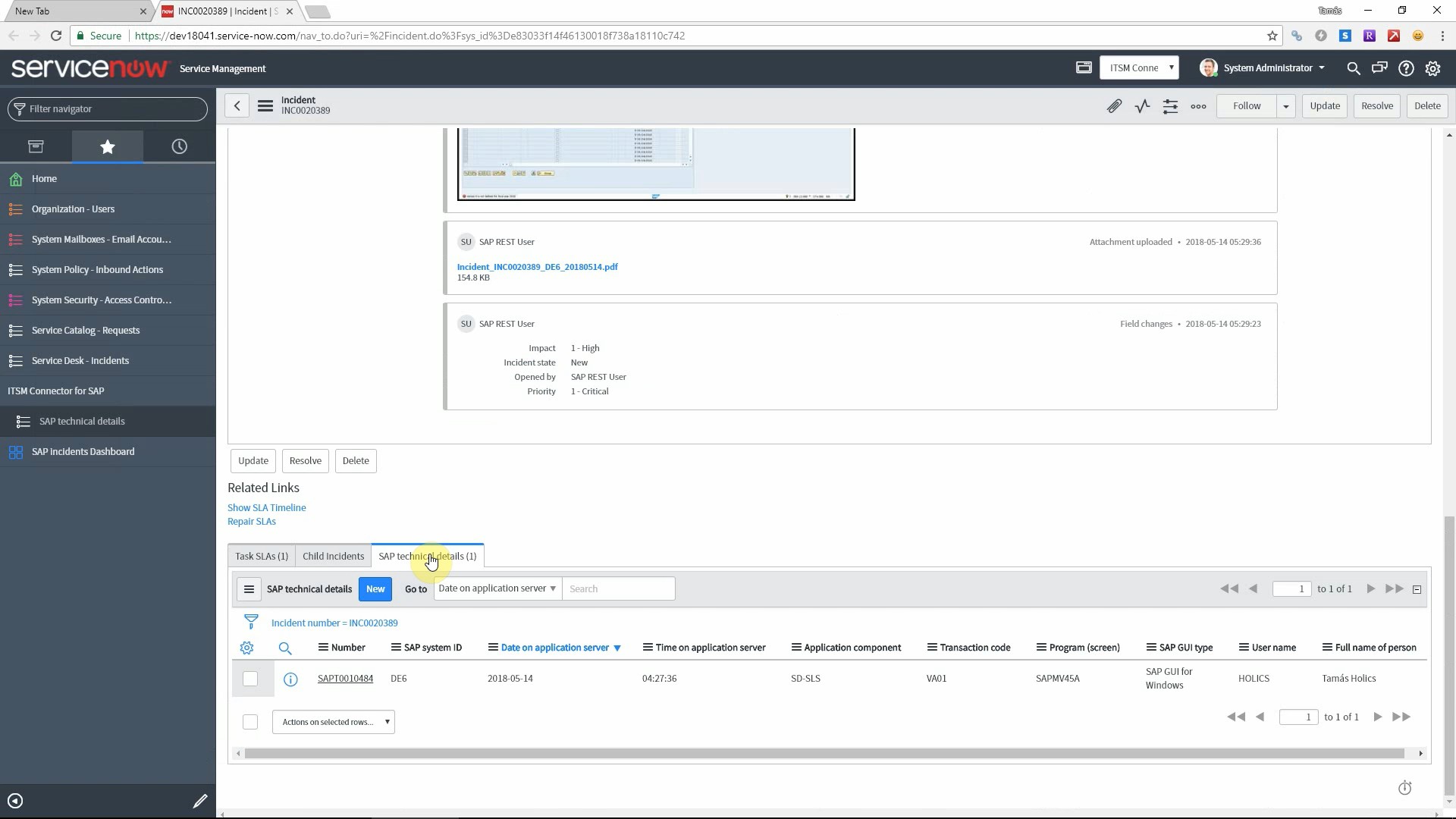
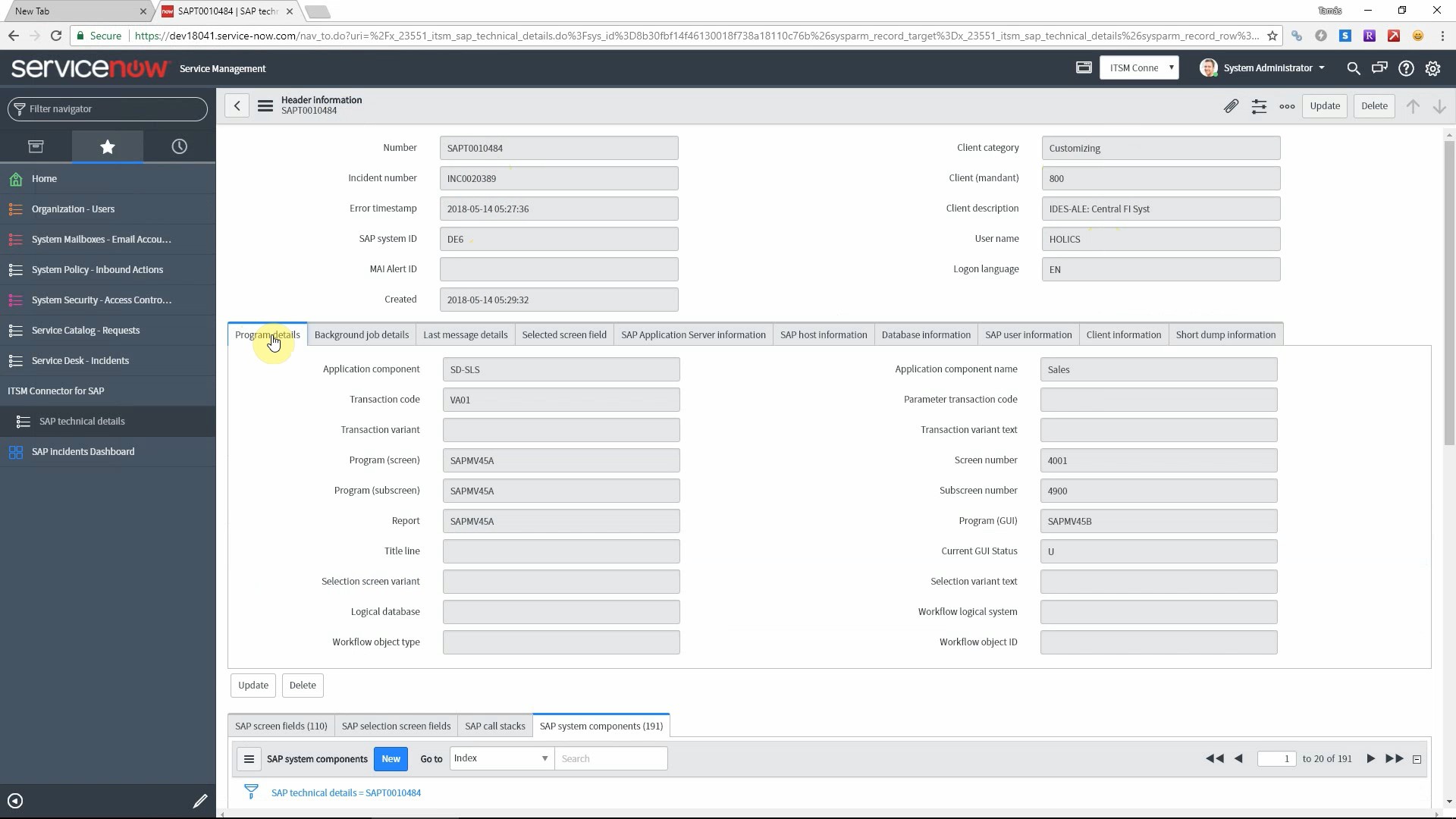
Display all SAP ticket details in ServiceNow

SAP - ServiceNow integration

Does your IT service desk lose time due to extra communication because of incomplete error reports? Now we have a convenient solution for you to display all SAP-specific information in ServiceNow so your support technicians do not have to to waste time to clarify all the details of the problem.

Additionally, having all technical details saved to ServiceNow tables, you can do advanced analytics of your SAP incidents using the capabilities of standard ServiceNow reports and dashboards.

The app is available as a free download from the ServiceNow Store.

ServiceNow App with a custom REST API endpoint

In addition to our SAP add-on we have developed a ServiceNow application that allows to add all SAP-related details to your incidents. This includes all technical details (like SAP system, program and user details) as well as the business context (all screen field values). Once you have all this information available directly from the incident screen, much less communication is required between the caller and the assigned support expert.

This scoped application provides a REST API endpoint that can be called to store all this information. Naturally our SAP add-on already contains this feature so you can create ServiceNow incidents directly from SAP and get your ServiceNow tables populated.

Advanced analytics of SAP incidents

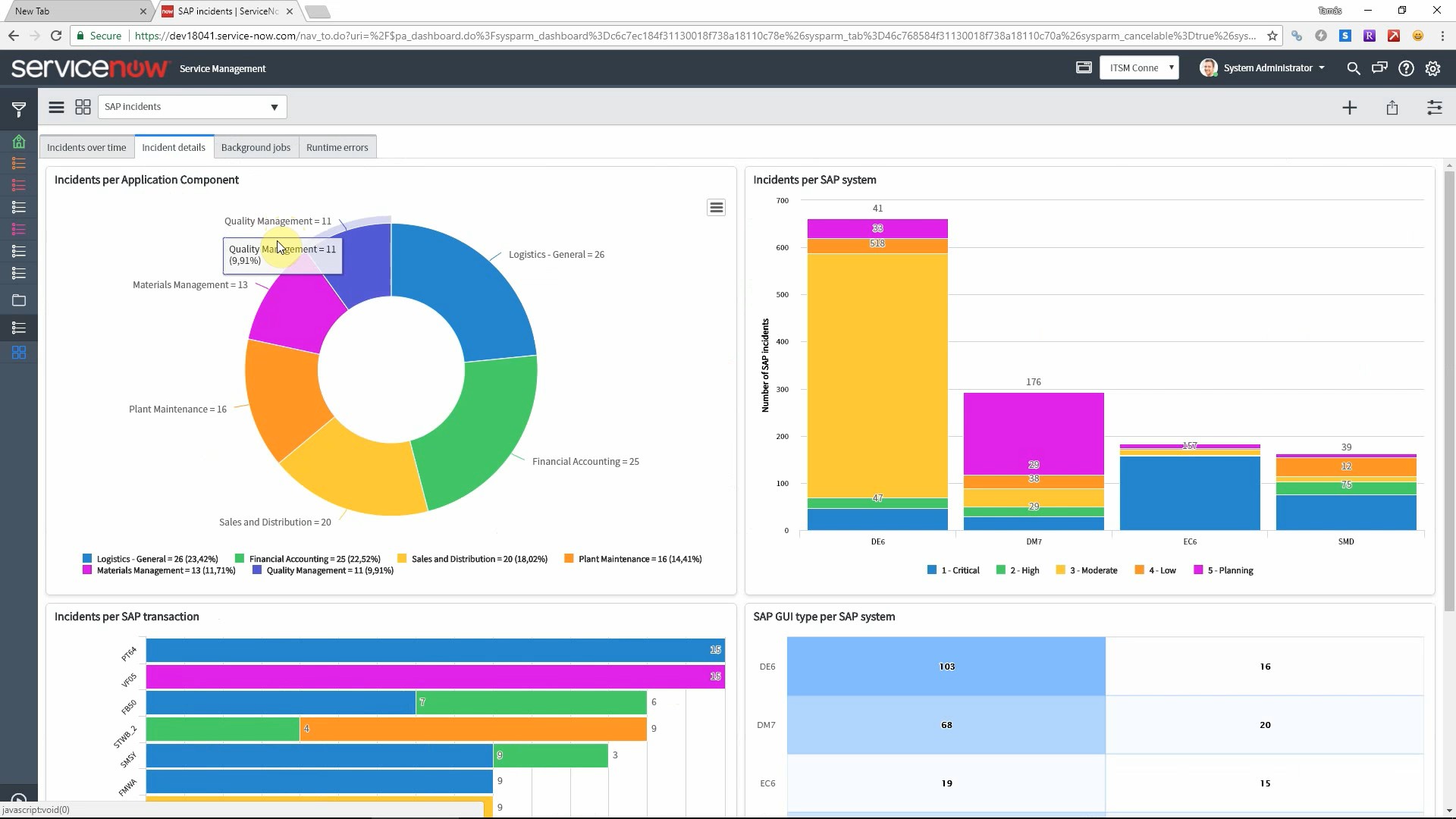
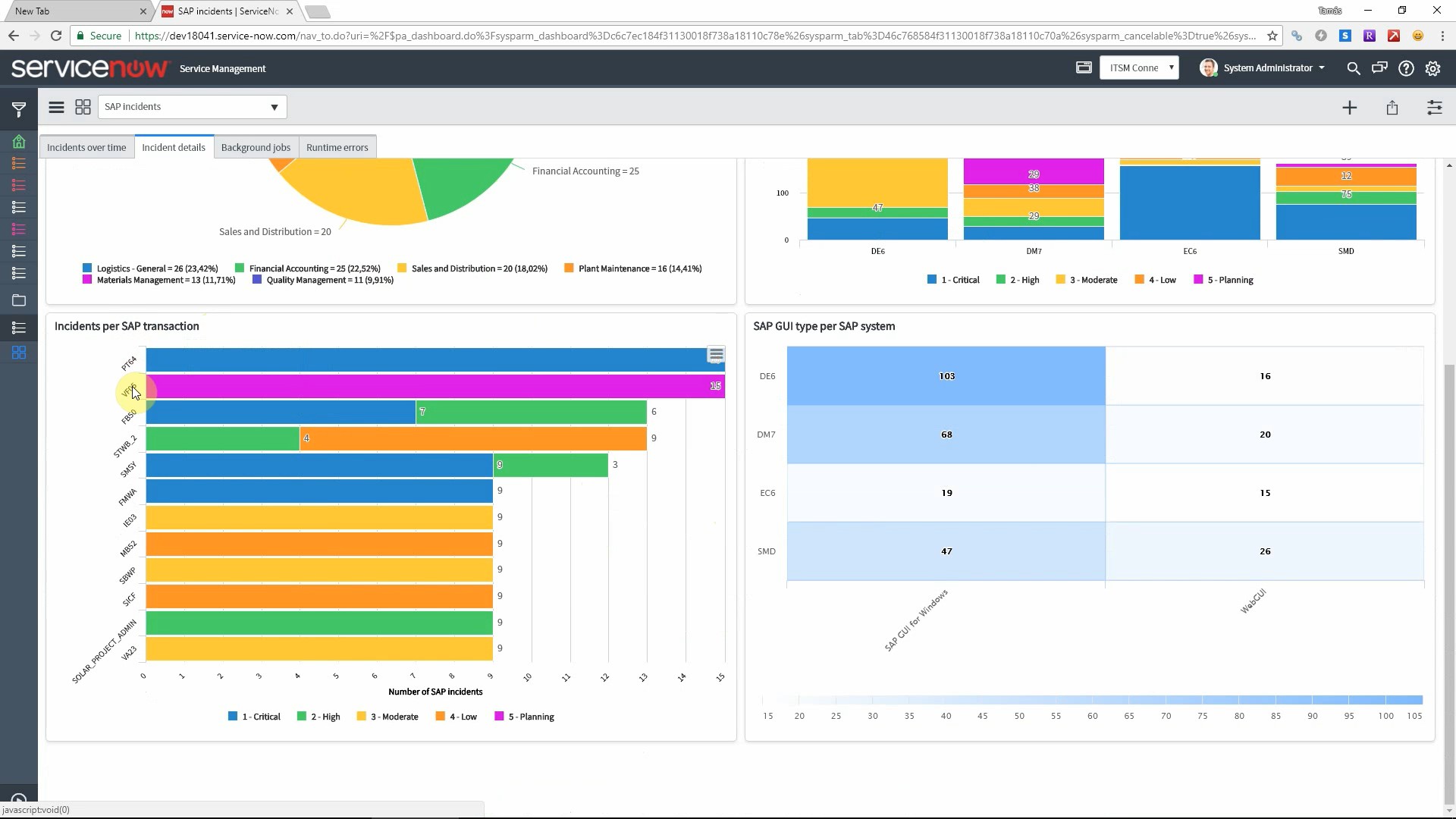
Another great result of having all this data in ServiceNow is that you can use the built-in reporting and dashboarding features of ServiceNow. You can blend the information from standard tables (incidents etc.) and the custom tables that hold SAP data. This provides you the possibility to analyze your SAP incident flow like never before. 

We deliver preconfigured reports and dashboards so you can get instant insights into your SAP incident flow.

Easy installation

Since ServiceNow introduced the application scope concept, installation is very easy and safe. Our product is delivered in its own namespace and follows the usual application lifecycle – deployment first in the development system and then in test and production systems.

Benefits

There are advantages for all parties involved in SAP incident handling. Support technicians can spend more time on actually solving problems than clarifying all missing details with the users who report the incidents. IT support team leads can analyze SAP-related incidents using a modern BI platform that ServiceNow provides. SAP end users can spare time too due to the quick and convenient ticket creation from the SAP user interface. Most importantly, everybody will be happy to see an improvement of KPIs because of all these benefits.

Video

Get an overview of the solution by watching the video below.

Next steps

Schedule a demo

Let’s make a conference call and show you how our products work and answer all your questions.

Download from the ServiceNow Store

Get the certified app from the ServiceNow Store.

Get in touch

Still have questions? Do not hesitate to contact us and get them answered.

Sharing is caring
Integration of Zendesk and SAP systems

Integrating Zendesk and SAP systems

Create Zendesk incidents from SAP enriched with all relevant information

Integrate SAP and Zendesk

Learn how you can integrate your SAP systems and Zendesk using STA Ticket System.

The most important benefit of this integration is that the entire technical and business context is attached to all incidents created from SAP. This provides tremendous value for your support staff and helps them solve problems much quicker.

This post will show integration using both Mail API and the REST API of Zendesk to create incidents.

What is STA Ticket System?

It is an add-on for SAP systems that must be installed on the SAP application server. It extends the SAP GUI with a menu item that allows users to report errors directly from the screen where the error happened. It works with R/3 based SAP systems that use the SAP Netweaver platform (for example SAP ECC, SAP BW) and the latest S/4 HANA systems as well.

Create Zendesk incidents from the SAP GUI

Using our add-on, SAP end-users can report errors directly from the SAP GUI. They don’t have to make a phone call, write emails or to log into Zendesk to create an incident manually. The process is simple and straightforward:

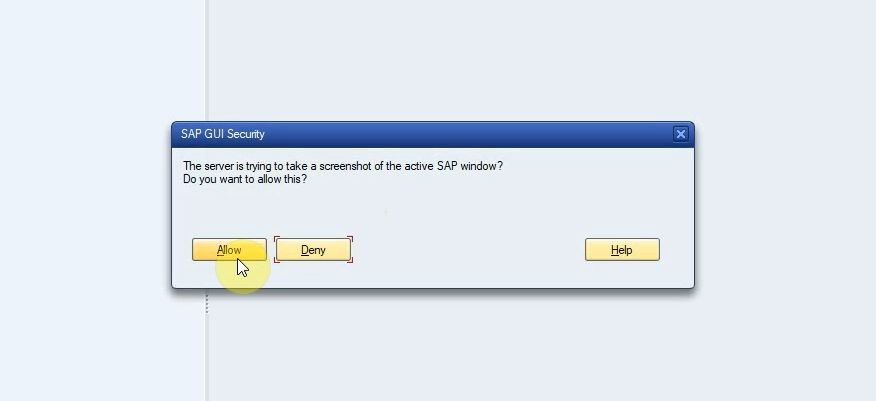
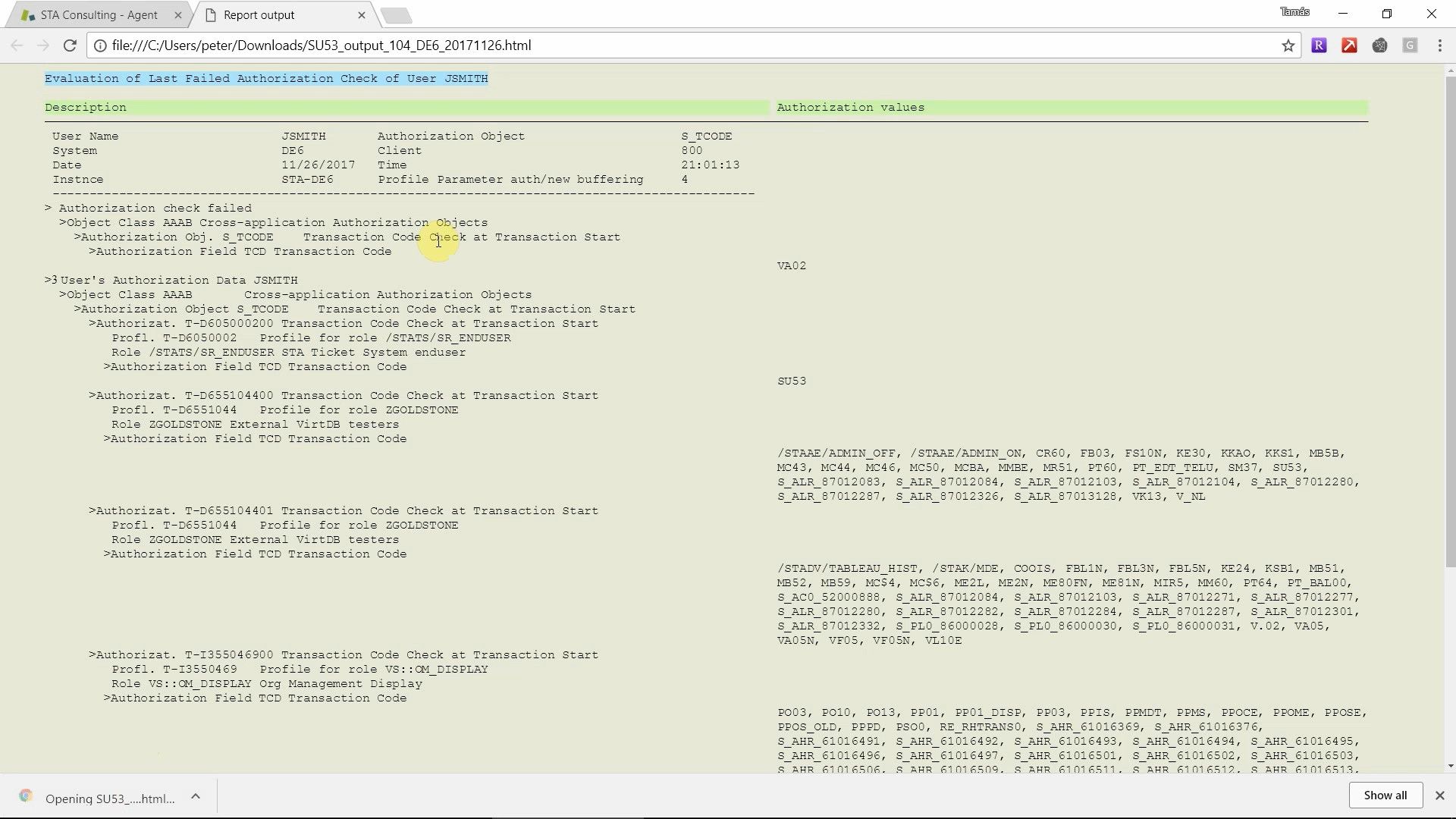
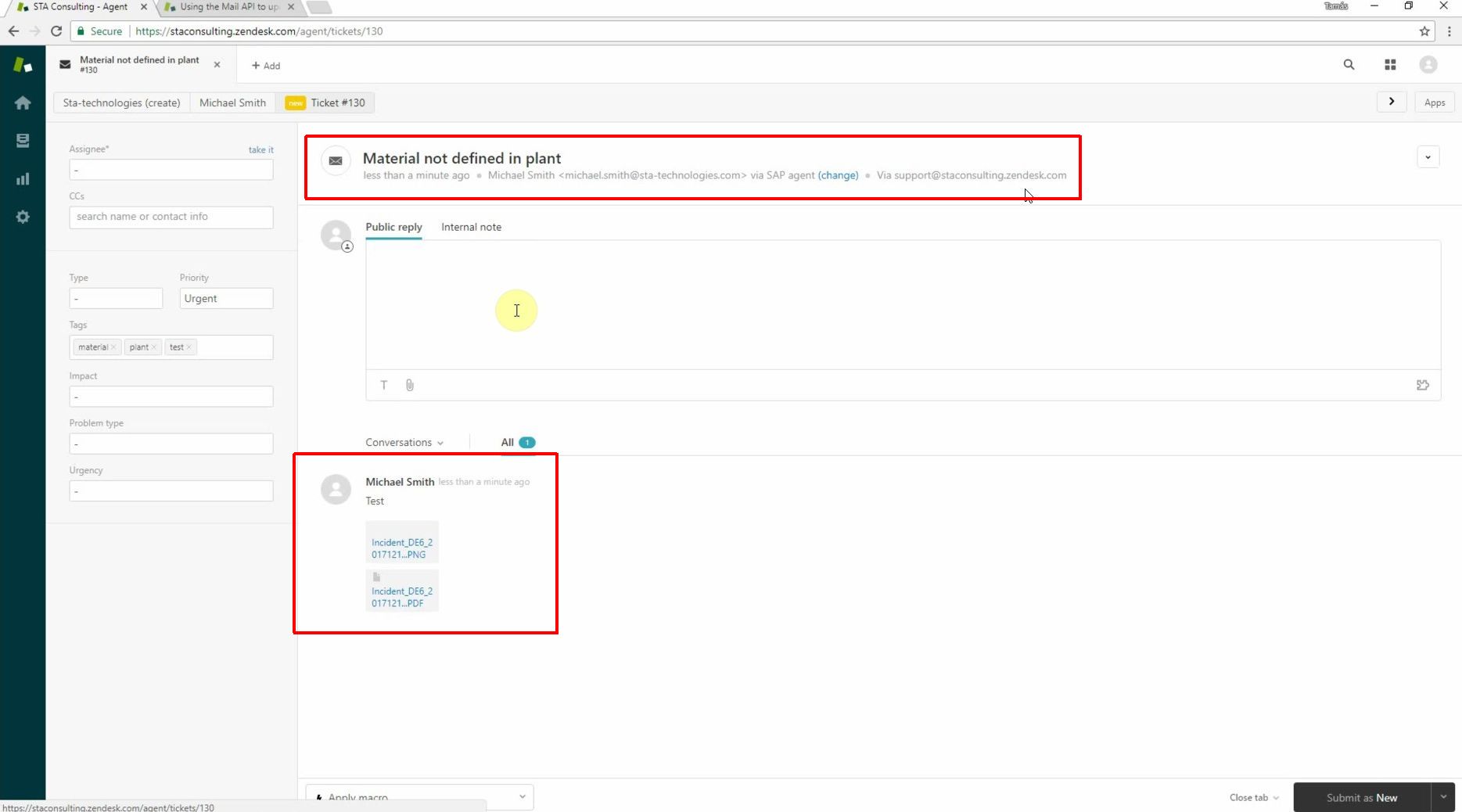
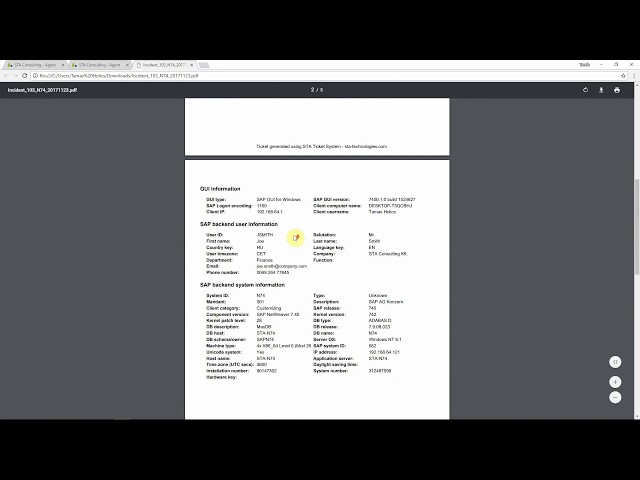
You can launch STA Ticket System in the program where the error occurred using the System menu. This displays the main screen of the product where you can enter a description of the problem and fill Zendesk fields in SAP. The bottom part of the screen can be customized so you can include all your custom Zendesk fields as well. When you are finished entering basic information, press “Send” to create the incident in Zendesk. The program automatically collects all important information about the SAP system, SAP user and currently running program and attaches it to the generated Zendesk incident. It additionally attaches an authorization report for the current user, a screenshot and optionally a shortcut to the transaction where the error occurred.

Having all this extra information in each incident provides huge benefit to the service desk staff. This almost completely eliminates the need to clarify missing details with the caller to be able to start working on the solution. This can potentially save days of waiting for clarification for multinational companies especially if SAP support is outsourced.

The Zendesk Mail API

Zendesk Mail API

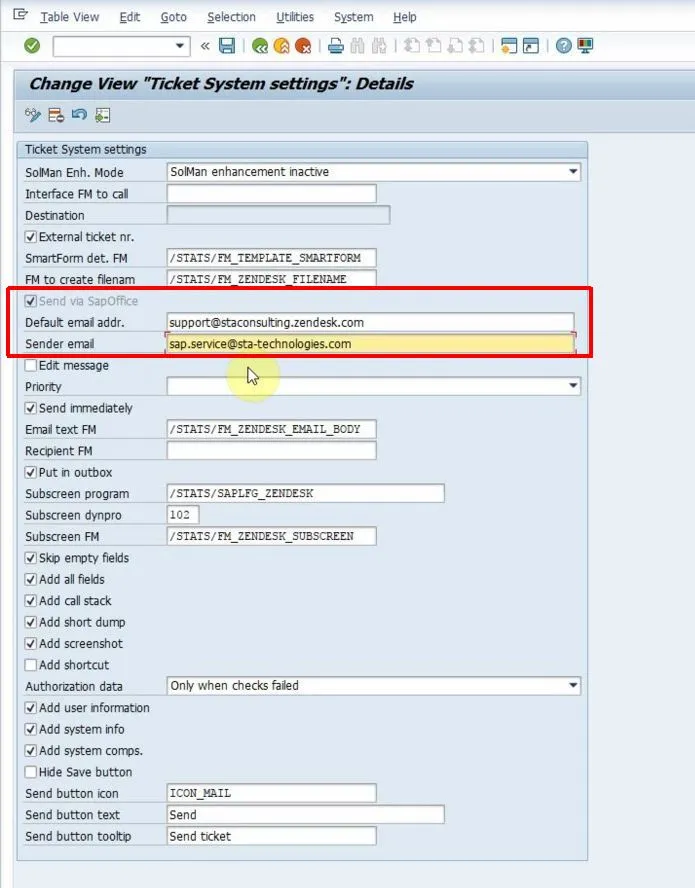
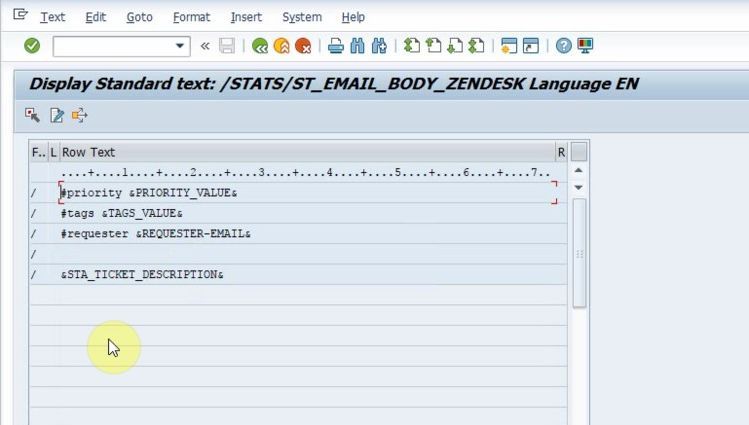
The Mail API allows you to create incidents from emails set to a Zendesk support mailbox and set ticket properties by adding commands to the body of the email. This is a great feature that allows a very simple integration. The standard SAPoffice module is used for sending emails to the Zendesk support mailbox. That mailbox is managed by Zendesk and if an email arrives that has a specific format, the Mail API will convert it to an incident. During this process, Zendesk parses the incoming email and populates the incident fields, short and long description and add all attachments of the email to the incident.

The REST API

Zendesk also has a REST API that can be used by our SAP add-on. This requires no configuration in Zendesk and very little on the SAP side. You have to install an SSL certificate of Zendesk in transaction STRUST and set up an RFC destination to Zendesk.

You can get an overview of the REST API of Zendesk here: https://developer.zendesk.com/rest_api

Zendesk REST API

Inbound Email Actions or REST API?

Both interfaces work fine create incidents from SAP systems, but it mostly depends on your service desk processes in place and on your infrastructure whether you should choose REST API or the Mail API.

Choose the Mail API if the connection from the SAP systems to Zendesk is difficult to implement (because of firewalls, company policy etc.). Using SAPoffice for sending emails can also store all error reports as outgoing emails which is good for reference. A drawback of using the Mail API is no immediate error message can be shown to the user if the incident cannot be created. This is due to the fact that the incident may be created a few minutes after submitting it from SAP and there is no feedback from Zendesk if the operation was succesful or not.

Choose the REST API if you want to use a modern interface or if you do not have SAPoffice configured, which is a prerequisite for sending emails from SAP. Another advantage is that users can get immediate feedback if the creation of the incident was successful or not.

Alternatively, you can create incidents by the email from SAP to a specified support desk mailbox (like [email protected]). All incoming emails can be processed by your support teams and they may decide to create an incident from it (either manually or by forwarding the email to the Zendesk support mailbox to trigger the Mail API) or classify it as user mistake and reply to the email. This approach keeps your existing processes in place and SAP users can’t create incidents in Zendesk directly.

Add custom Zendesk fields

You can add your custom fields used in Zendesk to the customer subscreen part of the main screen of STA Ticket System. You can also implement any business logic you require, like filling fields with default values etc. We deliver a template that you can use out of the box. If you need anything custom, simply copy and modify it to include your own business logic. Your own ABAP developers can implement this or we can help you with consulting services to implement everything you need.

Benefits

Having a full information package attached to every incident that is created, you can expect a significant reduction in ticket resolution time. It is also much quicker to submit an error report so your SAP users will have to spend less time on reporting problems from their valuable working time. The final result is a significant reduction of SAP maintenance costs as well as other indirect benefits, like less system downtime and job satisfaction.

Listed in the Zendesk Apps Marketplace

Having a full information package attached to every incident that is created, you can expect a significant reduction in ticket resolution time. It is also much quicker to submit an error report so your SAP users will have to spend less time on reporting problems from their valuable working time. The final result is a significant reduction of SAP maintenance costs as well as other indirect benefits, like less system downtime and job satisfaction.

Listed in the Zendesk Apps Marketplace

STA Ticket System is listed as “STA SAP Connector” in the IT & Project Management category of Zendesk Apps Store. You can contact Zendesk as well as us directly to get in touch and start a free 30-day trial.

You can jump to the listing here: https://www.zendesk.com/apps/support/sta-sap-connector/

Zendesk

Next steps

Schedule a demo

Let’s make a conference call and show you how our products work and answer all your questions.

Download a free trial

Get a free 30-day trial and test the product in your own SAP systems.

Get in touch

Still have questions? Do not hesitate to contact us and get them answered.

Sharing is caring